Store and Forward Settings
info
Currently only available for ESP32 based devices with external PSRAM. Requires the device to be set as a router.
Don't enable Store and Forward Module on multiple routers.
Overview
caution
This is a work in progress and is partially available. Stability is not guaranteed.
important
The Store Forward Module is an implementation of a Store and Forward system to enable resilient messaging in the event that a client device is disconnected from the main network.
Because of the increased network traffic for this overhead, it's not advised to use this if you are duty cycle limited for your airtime usage nor is it advised to use this for SF12 (Long Range / Slow).
tip
Once module settings are changed, a reset is required for them to take effect.
Settings
| Setting | Acceptable Values | Default |
|---|---|---|
| store_forward_module_enabled | true, false | false |
| store_forward_module_heartbeat | true, false | false |
| store_forward_module_history_return_max | integer | 0 |
| store_forward_module_history_return_window | integer | 0 |
| store_forward_module_records | integer | 0 |
store_forward_module_enabled
Enables the module.
- CLI
- Android
- iOS
- Web
meshtastic --set store_forward_module_enabled true
meshtastic --set store_forward_module_enabled false
info
Configuring this setting is not yet available for the selected platform. If this is incorrect please update the documentation for this page.
info
Configuring this setting is not yet available for the selected platform. If this is incorrect please update the documentation for this page.
info
Configuring this setting is not yet available for the selected platform. If this is incorrect please update the documentation for this page.
store_forward_module_heartbeat
The Store & Forward Router sends a periodic message onto the network. This allows connected devices to know that a router is in range and listening to received messages. A client like Android, iOS, or Web can (if supported) indicate to the user whether a store and forward router is available.
- CLI
- Android
- iOS
- Web
meshtastic --set store_forward_module_heartbeat 0
info
Configuring this setting is not yet available for the selected platform. If this is incorrect please update the documentation for this page.
info
Configuring this setting is not yet available for the selected platform. If this is incorrect please update the documentation for this page.
info
Configuring this setting is not yet available for the selected platform. If this is incorrect please update the documentation for this page.
store_forward_module_history_return_max
Sets the maximum number of messages to return to a client device.
- CLI
- Android
- iOS
- Web
meshtastic --set store_forward_module_history_return_max 0
meshtastic --set store_forward_module_history_return_max 100
info
Configuring this setting is not yet available for the selected platform. If this is incorrect please update the documentation for this page.
info
Configuring this setting is not yet available for the selected platform. If this is incorrect please update the documentation for this page.
info
Configuring this setting is not yet available for the selected platform. If this is incorrect please update the documentation for this page.
store_forward_module_history_return_window
Limits the time period (in minutes) a client device can request.
- CLI
- Android
- iOS
- Web
meshtastic --set store_forward_module_history_return_window 0
meshtastic --set store_forward_module_history_return_window 1440
info
Configuring this setting is not yet available for the selected platform. If this is incorrect please update the documentation for this page.
info
Configuring this setting is not yet available for the selected platform. If this is incorrect please update the documentation for this page.
info
Configuring this setting is not yet available for the selected platform. If this is incorrect please update the documentation for this page.
store_forward_module_records
Set this to the maximum number of records to save. Best to leave this at the default (0) where the module will use 2/3 of your device's available PSRAM. This is about 11,000 records.
- CLI
- Android
- iOS
- Web
meshtastic --set store_forward_module_records 0
meshtastic --set store_forward_module_records 100
info
Configuring this setting is not yet available for the selected platform. If this is incorrect please update the documentation for this page.
info
Configuring this setting is not yet available for the selected platform. If this is incorrect please update the documentation for this page.
info
Configuring this setting is not yet available for the selected platform. If this is incorrect please update the documentation for this page.
Details
How it works
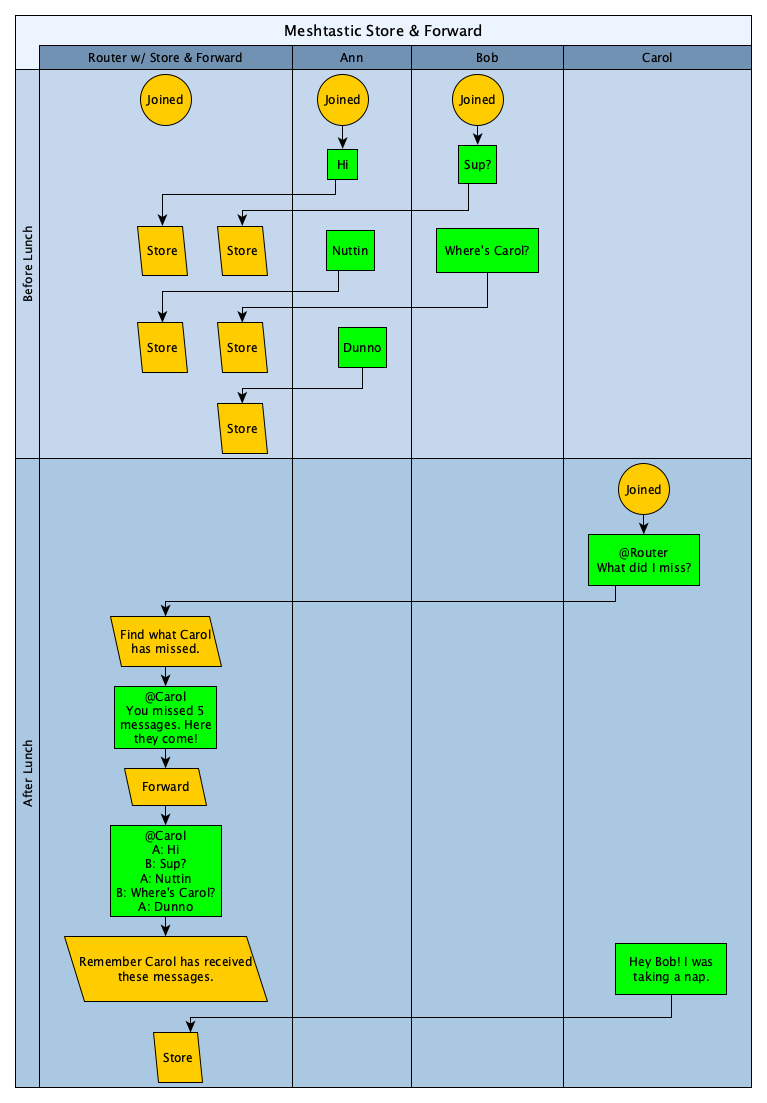
Requirements
Initial Requirements:
- Must be installed on a router node.
- This is an artificial limitation, but is in place to enforce best practices.
- Router nodes are intended to be always online. If this module misses any messages, the reliability of the stored messages will be reduced.
- Esp32 Processor based device with external PSRAM. (tbeam v1.0 and tbeamv1.1, and maybe others)
Usage Overview
- To use / test this you will want at least 3 devices
- One device will (currently) need be a tbeam v1.0 and tbeamv1.1 configured as a Meshtastic router. Other devices with built in PSRAM will be supported at some point.
- Two others will be regular clients. Nothing special required.
Meshtastic channel configuration
Don't use this on the "Long Range / Slow" or "Long Range / Fast" channel settings. You're welcome to try and report back, but those channels have a very low bitrate.
Either use a custom channel configuration with at an at least 1kbit data rate or use "Medium Range / Fast".
Recommended channel setting is for 1.343kbps:
meshtastic --setchan spread_factor 11 --setchan coding_rate 5 --setchan bandwidth 500
With an aftermarket coaxial antenna or moxon antenna, that will give you roughly the same range as "Long Range / Slow" and 5x the bitrate.
Router setup
warning
Don't enable the Store and Forward module on multiple routers!
- Configure your device as a meshtastic router.
- Name your router node something that makes it easily identifiable, aka "Router".
- Configure the Store and Forward moduleRequired - Enable the module
meshtastic --set store_forward_module_enabled trueOptional - Set maximum number of records to save to devicemeshtastic --set store_forward_module_records 100tip
Best to leave
store_forward_module_recordsat the default (0) where the module will use 2/3 of your device's available PSRAM. This is about 11,000 records.
Client Usage
Currently, no special configuration is required. To request your history sent to you, send the command into the message field "SF". That's it. This will eventually change to make it easier. At the moment, that message will be sent to everyone on the mesh but we'll (eventually) make it easier to use where there'll be a button (or maybe it'll be transparent) and the command isn't sent as a text message to the mesh.
Available Commands:
| Command | Definition |
|---|---|
| SF | Send the last few messages I may have missed |
| SFm | Send a 240 byte payload (Used for testing) |
The Store and Forward module will only service one client at a time. If a second client requests messages while the S&F is busy, the S&F will send a private message to the second client that they will need to wait.